

Have you ever wondered if you could create more flexible lookups? Maybe you have a function where the user is required to select a record from a specific table, depending on the situation?
As an example, let’s create a copy function for sales document comments.
Page.RunModal(0,Rec) is providing a hidden "feature". The compiler does not allow you to pass something like a RecordRef into the function, but it does allow you to pass a variant. And the most interesting thing is that the Variant will contain the value of the last record selected, when “RunModal = Action:LookUp” evaluates to true.
So, for example, we can apply a filter to a RecordRef (or the actual Record) according to the document type and pass the filtered record into a Variant. If we don’t need any pre applied filters, we just open the RecordRef or pass an unfiltered Record into the Variant.
For simplicity, we choose the RecordRef approach here, since the enumeration ordinals of “Sales Comment Document Type” conveniently match those of the “Sales Document Type” for the unposted documents.
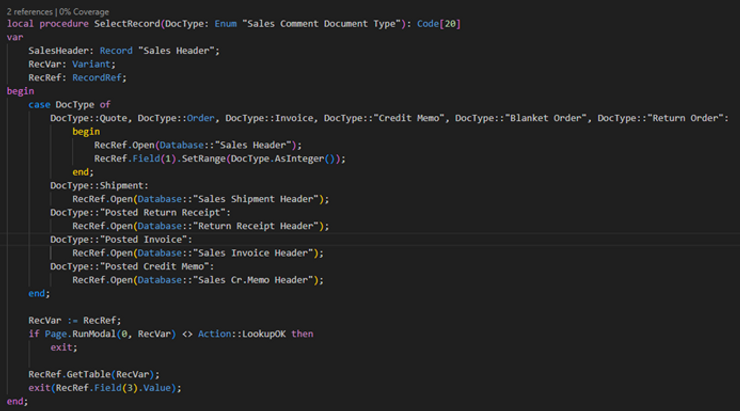
This function enables us to quickly write a multi table lookup, returning the Document No. of the chosen Document Type.
The full source code of “Copy Sales Comments” can be found in our GitHub Repository.

