If you want to import several objects based on a textfile, you should split them and run this PowerShell script:
Import-Module "C:\Program Files (x86)\Microsoft Dynamics 365 Business Central\140\RoleTailored Client\Microsoft.Dynamics.Nav.Ide.psm1"

Get-ChildItem $PSScriptRoot -Filter *.txt | Import-NAVApplicationObject -DatabaseName "Demo Database NAV (14-0)" -DatabaseServer SQL01 -NavServerInstance BC140 -NavServerManagementPort 7045
This two-liner will import all .txt files from your PowerShell script root folder into your database.
Example: Import Errors
Any importing errors will be shown separately.
This is the first entry in your log:
Import-NAVApplicationObject : : \[21364760\] Es gibt einen Syntaxfehler beim Import auf Zeile 219 , Position 16 : DecimalPlaces=0:5;.
Ein '{' (ElemBegin) wurde erwartet. -- File: C:\\page_0000000515.TXT
\[0\] Der Import brach ab bei Zeile 219. -- File: C:\\page_0000000515.TXT
In Zeile:1 Zeichen:81
- ... ter *.txt | Import-NAVApplicationObject -DatabaseName "Demo Database ...
- ~~~~~~~~~~~~~~~~~~~~~~~~~~~~~~~~~~~~~~~~~~~~~~~~~~~~~~~~~
- CategoryInfo : NotSpecified: (:) [Write-Error], WriteErrorException
- FullyQualifiedErrorId : Microsoft.PowerShell.Commands.WriteErrorException,Import-NAVApplicationObjectThis is the second entry:
Import-NAVApplicationObject : : \[23462179\] Das Funktionsattribut \[AccSchedLine2\] ist in diesem Kontext ungültig. -- File: C:\\report_0000000029.TXT
\[0\] Der Import brach ab bei Zeile 390. -- File: C:\\report_0000000029.TXT
In Zeile:1 Zeichen:81
- ... ter *.txt | Import-NAVApplicationObject -DatabaseName "Demo Database ...
- ~~~~~~~~~~~~~~~~~~~~~~~~~~~~~~~~~~~~~~~~~~~~~~~~~~~~~~~~~
- CategoryInfo : NotSpecified: (:) [Write-Error], WriteErrorException
- FullyQualifiedErrorId : Microsoft.PowerShell.Commands.WriteErrorException,Import-NAVApplicationObjectCritical Error
If you see this error:
Interner Fehler '9' in Modul '24'. Internal Error '9' in Module '24'.
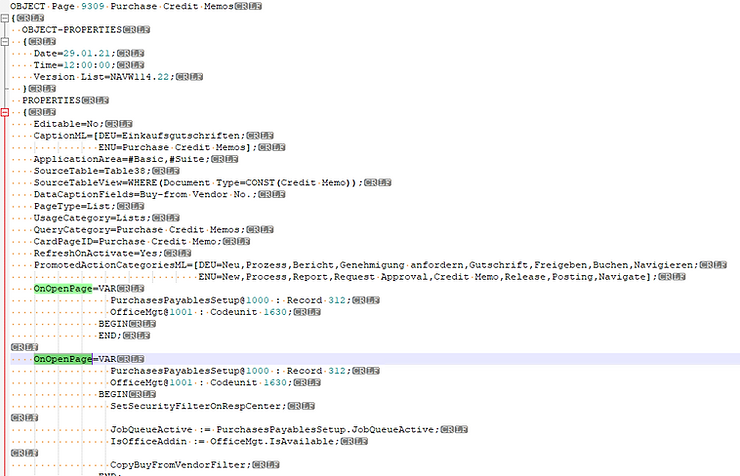
Then you should check your object for doubled triggers: