Regex replacement in VS Code

How-To USE Search-and-Replace Regex in VS Code

Daniel Gorski
Daniel Gorski 18. Februar 2021
1 Min. Lesezeit

How-To solve usage of implicit 'with' in VS Code (AL0604)

AL(AL0604):
Use of implicit 'with' will be removed in the future.
Qualify with Rec. – this warning will become an error in a future release.


Hey guys,

you might know that VS Code supports usage of search-and-replace with regular expressions?

If you want to know how this reg-ex works, just visit:
https://regex101.com/r/Rx7sPI/4
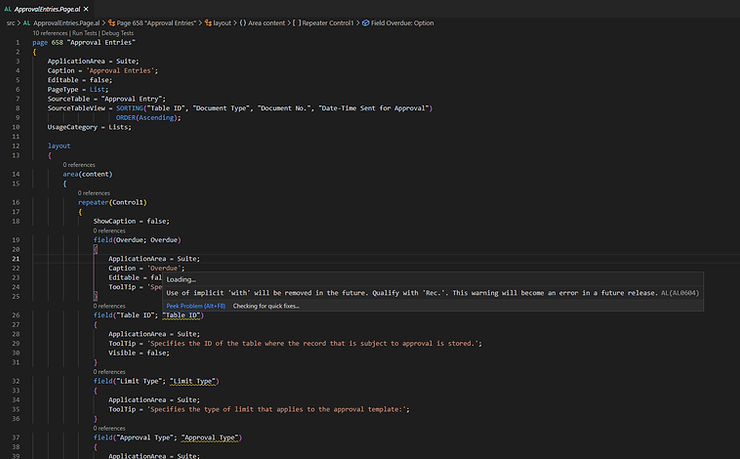

Open your search dialog with CTRL+H

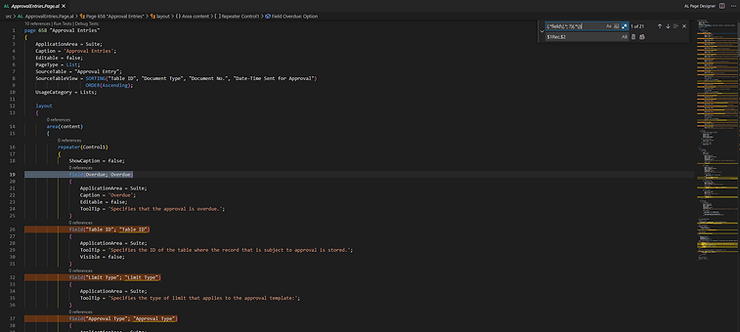
Use this in your Find field:

(\w*field\(.*; ?)(.*\))

And this in your Replace field:

$1Rec.$2

Then hit the "Use Regular Expression" button (ALT+R):


Your matching lines will be marked:
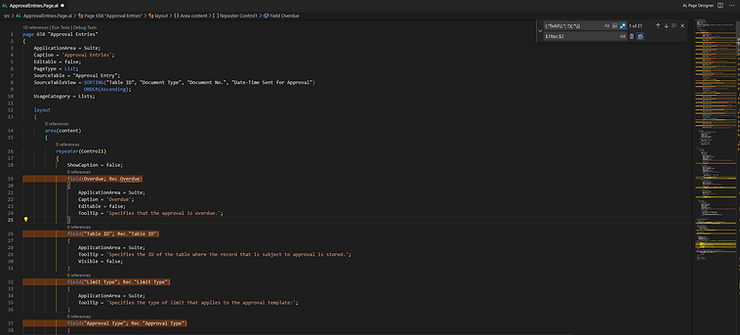
Replace it – and you’re fine 😎
how-to
development
regex
vs code
al code
search and replace
al0604
Azure Communication Services SMTP with Scanner

Using Azure Communication Services SMTP with Your Scanner or Printer

Need to send scans via email from your office scanner? Azure Communication Services provides a reliable SMTP relay that works with any device supporting SMTP au

Weiter lesen
Weiter lesen
XRechnung Einrichtung in Business Central

XRechnung in Business Central einrichten: Schritt für Schritt zur E-Rechnung

Ab 2025 wird die E-Rechnung im B2B-Bereich in Deutschland Pflicht. Wir zeigen Ihnen, wie Sie XRechnung in Business Central einrichten – mit E-Beleg-Dienst, Work

Weiter lesen
Weiter lesen