

... and other tables. I've used it for my demo-db. Take it "as is" and at your own risk.
Keep tables like "Change Log Entry" or "Job Queue Log Entry" as empty as possible - if you want to ;-)!
Use e.g. RapidStart to see how many records are stored:
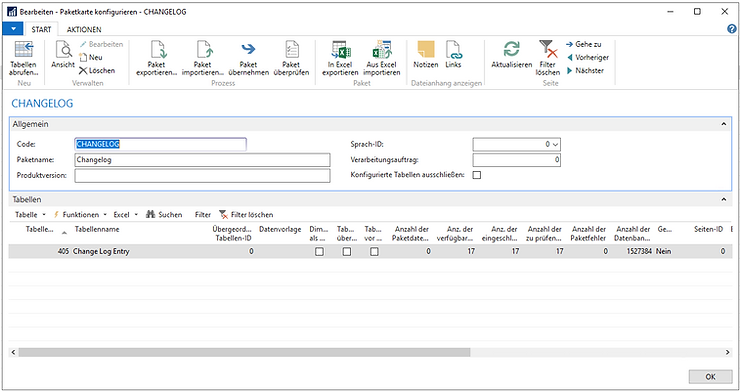
I've used the DATEADD-Command in my sql-statement to add a date/time interval to a specific date which returns a date:
select DATEADD(day, -360, SYSDATETIME()) as "360DaysAgo";throws:
360DaysAgo
2020-02-16 13:41:05.1657480
Open your Microsoft SQL Server Management Studio and run this statement to see how many records are older than 360 days:
(Replace DBNAME and COMPANYNAME with your specific values)
Use [DBNAME]

select *
from
[dbo].[COMPANYNAME$Job Queue Log Entry]
where
[dbo].[COMPANYNAME$Job Queue Log Entry].[Start Date_Time] < DATEADD(day, -360, SYSDATETIME())

select *
from
[dbo].[COMPANYNAME$Change Log Entry]
where
[dbo].[COMPANYNAME$Change Log Entry].[Date and Time] < DATEADD(day, -360, SYSDATETIME())
You can also delete them by throwing a delete-statement for records which are older than six months. (Use it at your own risk. Take a backup of your database before running this.)
Hint: You are going to use this code as a sample only and at your own risk. Support is not provided for this.
Use [DBNAME]

delete
from
[dbo].[COMPANYNAME$Job Queue Log Entry]
where
[dbo].[COMPANYNAME$Job Queue Log Entry].[Start Date_Time] < DATEADD(month, -6, SYSDATETIME())

delete
from
[dbo].[COMPANYNAME$Change Log Entry]
where
[dbo].[COMPANYNAME$Change Log Entry].[Date and Time] < DATEADD(month, -6, SYSDATETIME())
